
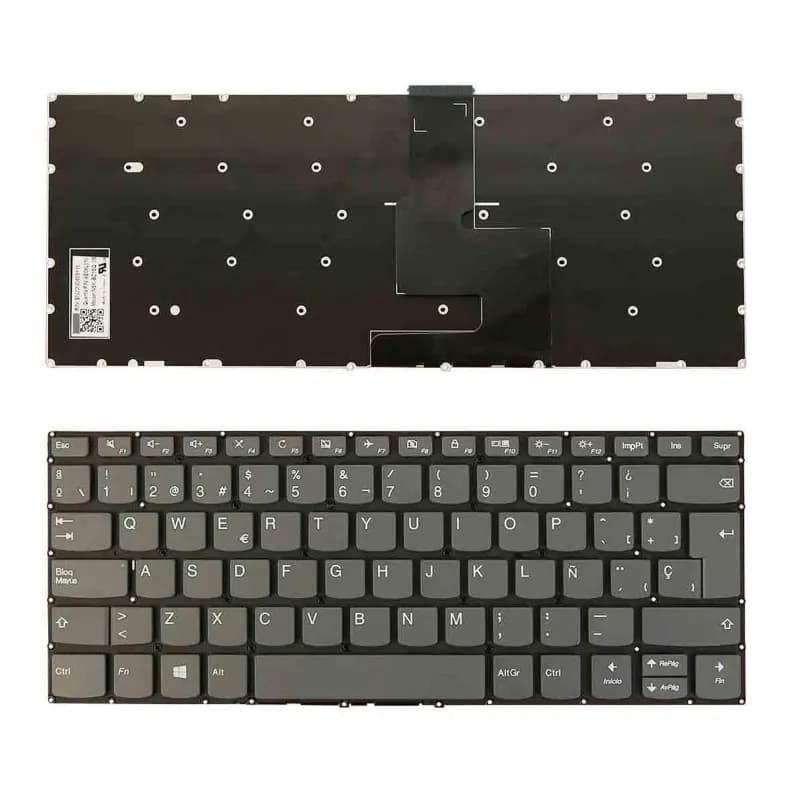
Lenovo IdeaPad 320S-15ABR (80YA) / 320S-15AST (80YB) Keyboard - New
Condição
Novo - Selado
Ciclos de Uso
0 (Nunca utilizado)
Código do Modelo
80YA / 80YB
Compatibilidade Adicional
Múltiplos modelos IdeaPad 320/310 Series
Original replacement keyboard for Lenovo IdeaPad 320S-15ABR and 320S-15AST laptops. Brand new, sealed product with zero cycles—ready for fast delivery across Portugal and Europe.
Key Features
- Condition: New and sealed, never used
- Compatibility: Lenovo IdeaPad 320S models 80YA/80YB
- Quality: Genuine laptop replacement part
- Easy Install: Straightforward replacement process
- Value: Best price for Lenovo keyboard spares
Compatible With
- Lenovo IdeaPad 320S-15ABR
- Lenovo IdeaPad 320S-15AST
- Lenovo IdeaPad 320S-15IKB
- Lenovo IdeaPad 320-14IKB
- Lenovo IdeaPad 310S-14
- Lenovo IdeaPad 3 14ABA7
- Lenovo Essential B50-10
- Lenovo IdeaPad 100-15
Why RM TechStore?
- 12-month warranty
- Portugal & EU shipping
- Lisbon store location
How to replace the keyboard
Some keyboards lift out from the top (clips); others need the laptop opened from underneath. Check your model's method — if unsure, we'll swap it in store.
Tools
- 🔧 Small Phillips screwdriver
- 🔧 Plastic spudger
- 🔧 Tweezers
Step by step
- 1
Shut down, unplug the charger and (if external) remove the battery.
- 2
Top-mount keyboard: release the clips along the top edge with the spudger and lift it out. Bottom-mount: open the bottom cover and remove the screws marked with a keyboard icon.
- 3
Tilt the keyboard and unplug the flat cable (lift the ZIF connector flap before pulling).
- 4
Connect the new keyboard's flat cable into the connector and close the flap.
- 5
Seat the new keyboard into the clips/screws and reassemble.
- 6
Power on and test every key, including Fn and the arrows.
Good to know: Flat cables tear easily — never pull the cable with the flap closed. Confirm the layout (PT/US) and backlight before buying.
Rather we fit it? We do it for you in store in Entrecampos, Lisbon.
Related products

Complete Keyboard for Lenovo Yoga 2 13" Black with White Casing

Lenovo ThinkPad Keyboard T400S T410 T420 X220 45N2083 - New Sealed

Lenovo G40-70 G40-80 Keyboard 852-42537-B2A | Spanish Layout

Lenovo ThinkPad Yoga 15 Keyboard PK1316V2A22 NSK-Z70BC - New

Keyboard for Lenovo ThinkPad Edge E430 Laptop 04W2520
